Evaluation Committee
The Evaluation Committee is a group of experts and leaders responsible for evaluating the proposals submitted in the innovation call, making strategic decisions about which projects will advance to the next phases and ensuring the integrity and quality of the selection process. The following are some guidelines for organizing a robust and efficient evaluation committee.
1. Multidisciplinary Composition
An Assessment Committee must be composed of professionals with different specialties and areas of activity within the company. This diversity allows for a complete and multidimensional analysis of each proposal, bringing insights from different angles, such as innovation, technology, market and strategic alignment. Professionals from different areas can raise specific questions and evaluate proposals with different criteria, promoting a rich and balanced analysis.
2. Fundamental Profiles in the Committee
The committee must include three main profiles of company professionals, each with specific contributions to the evaluation of innovative projects:
Senior Executives (such as directors and VPs of strategic areas): these professionals provide a long-term vision and contribute to the analysis of the proposal’s alignment with the company’s general objectives. His experience in leading the organization allows for a more focused assessment of impact and scalability.
Technical Experts (such as engineers, developers and research and development specialists): these members have in-depth technical knowledge and are essential for evaluating the feasibility, originality and innovation of proposals. They help identify the technical aspects of the solution and anticipate operational challenges.
Innovation Leaders (such as innovation managers and department heads): with experience in project management and development of new ideas, these professionals are able to evaluate proposals in terms of execution, implementation feasibility and impact on the market. They understand the innovation process and help identify ideas that can bring competitive advantages.
For an effective Assessment Committee, it is crucial to align members with the company’s innovation strategy, ensuring they understand the objectives and goals of each call. Defining clear responsibilities for each evaluator, according to their expertise, guarantees an in-depth and coherent analysis with the selection stages, while impartiality and transparency practices promote fair and ethical evaluations. With these precautions, the committee becomes a strategic tool for identifying and selecting the proposals that are most aligned with organizational growth and innovation.
**Structure of the **Evaluation CommitteeThe role of each committee member is defined in the Assessment committee. They can be designated as call managers, responsible for coordinating and managing the entire innovation call process, or as evaluators, responsible for evaluating applications submitted by participants. For evaluators, it is possible to configure whether they will be evaluators for all phases of the selection process or specific phases. Additionally, you can choose to allow or restrict evaluators’ access to challenges presented by participants, ensuring a fair and impartial evaluation.
Register new member
The committee structure includes essential fields for managing members, such as name and email, as well as a type of permission that defines the role of each member — whether as a call manager, responsible for coordinating and organizing the entire process, or as an evaluator, focused on analyzing proposals. This division of functions allows for effective monitoring and ensures that each proposal is examined according to the expertise and specific responsibilities of each committee member.
- Viewing the steps: Evaluators will only be able to view and participate in the steps that have been specifically activated for them. This guarantees a segmented evaluation, where each evaluator only accesses the phases in which their participation was designated, respecting the planned organization and promoting a focused and impartial evaluation experience. This configuration not only limits access to the relevant steps, but also contributes to the integrity of the evaluation process, avoiding external influences on the evaluations of other steps.
- Projects: The project movement option allows evaluators, when authorized, to advance an idea to subsequent phases of the innovation funnel. With this function, trained evaluators can indicate the progress of a promising proposal, elevating it in the selection process. This resource provides agility to the process, respecting the flow of steps and ensuring that projects with significant potential progress in an efficient and structured manner.
- Visualization of challenges: To ensure that the analysis of each proposal is conducted accurately, evaluators’ access to the challenges is carefully delimited. Each evaluator will only be able to view proposals linked to the challenges or themes that were previously assigned to them, based on their specialty and alignment with the objective of the program. This specialized filter strengthens the quality of the evaluation, ensuring that each idea is examined by a specialist with in-depth and relevant knowledge, promoting a careful analysis directed towards the objectives of the innovation call.
These configurations offer a structured and robust approach to managing assessments, ensuring that the process is conducted efficiently, judiciously and in accordance with the strategic planning of the innovation call.
Member listThe List of Evaluation Committee Members allows you to view all evaluators and call managers registered in the system. This list provides a clear view of the composition of the committee, facilitating the management of the members designated to evaluate the submitted proposals. Furthermore, it offers practical tools to manage the participation of each member, ensuring that the evaluation process occurs in an efficient and organized manner.
- Edit: allows managers to make changes to committee member information, such as name, email and type of permission (manager or evaluator). This is essential to keep data up to date and ensure that all assessors have correct access to the steps and challenges relevant to their roles. Editing makes it easier to adapt the composition of the committee to the needs of the innovation program, responding to any changes in the scope or strategy of the call.
- Resend Notification: is a valuable tool to ensure that all committee members are aware of their roles and responsibilities. By resending a notification email, managers can remind evaluators about deadlines, evaluation criteria and process steps, minimizing the chance of communication lapses. This function is especially useful when adding new members or reactivating participants in evaluation processes.
- Inactivate User: allows managers to temporarily remove a member from the committee without permanently deleting their information from the system. This may be necessary in situations where an assessor is unable to participate in a particular call, ensuring that the assessment process remains fluid and uninterrupted. Inactivation is a best practice to maintain committee integrity while preserving historical attendance records.
- **Delete User: **is used to permanently remove a committee member from the list. This action is recommended when an evaluator is no longer part of the evaluation process or when there is a need to reorganize the composition of the committee. Deletion ensures that only active and relevant members remain in the system, contributing to more efficient and transparent management of the evaluation committee.
These functionalities allow for effective management of the ** **List of Evaluation Committee Members, ensuring that the selection process is conducted with maximum efficiency and professionalism.
**Guide for the **Evaluation Committee
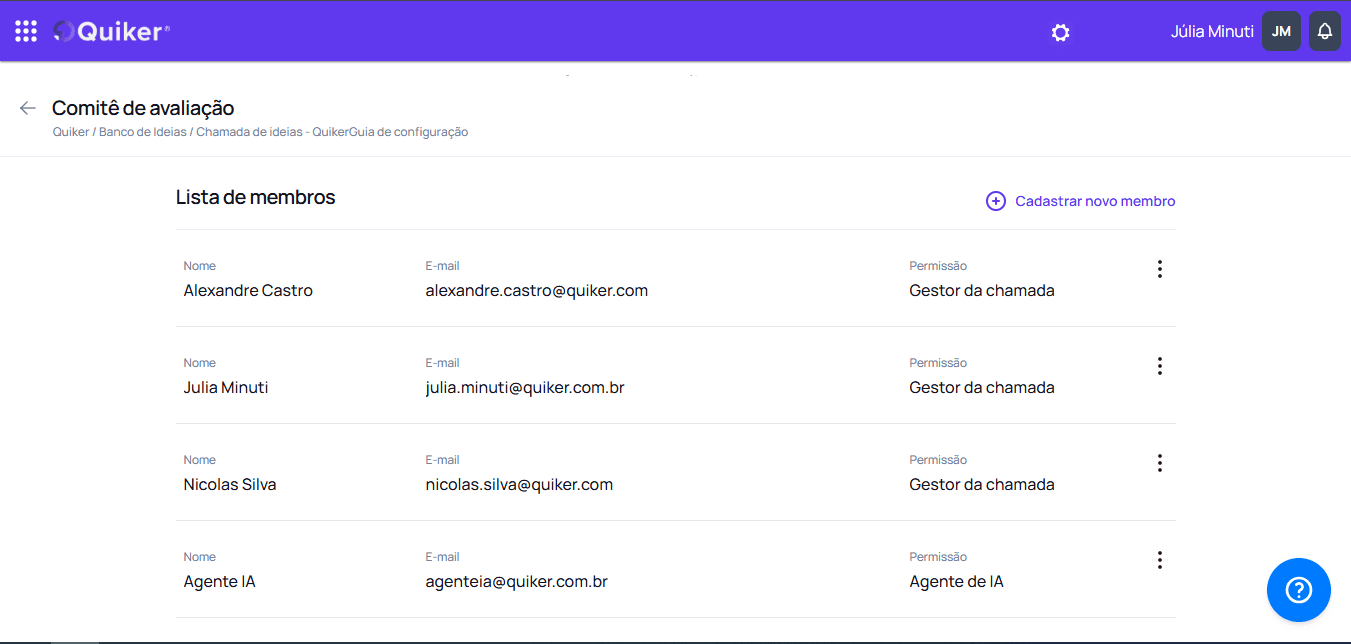
In the Register Member section, provide the necessary data to clearly define the role of each committee member, aligning with the innovation call strategy.
Step 1: Access Evaluation Committee Registration
- On the platform, within the call edition, go to Register Evaluation Committee > Register Committee
Step 2: Register New Member
On the new member page, configure:
Step 2.1: Member Name
- Enter the full name of the member who will be registered.
- Name: João Silva
This name will be used internally to identify the member in the system, facilitating the management and organization of the committee.### Step 2.2: Member Email
- Enter the member’s email address so they can receive notifications and relevant information about the call.
- Email: joao.silva@empresa.com
This email will be essential for communication, allowing the member to always be updated on the steps and responsibilities associated with the evaluation process.
Step 2.3: Permission Type
- Select the permission type that defines the member’s role on the committee.
- Permission Type: Call Manager / Evaluator
This choice is crucial to ensure that the roles and responsibilities of each member are clear, ensuring effective monitoring of the evaluation process. A call manager will coordinate the process, while an evaluator will focus on analyzing the proposals.
Step 2.4: Editing the Form in Steps
- Activate the steps that you want to allow the evaluator to edit the form completed by the employee.
Raters will only be able to edit form sections in the steps that have been specifically enabled for them. To do this, you must select the step that will allow editing in the form section. This allows evaluators to correct errors and fill in a section specific to them on the form, such as a section called “Opinion”, to be filled in with the evaluator’s opinion on the application.
Step 2.5: Viewing the Steps
- Activate the steps that you want to allow the evaluator to view and evaluate.
Evaluators will only be able to view and participate in the steps that have been specifically enabled for them. This ensures that each reviewer has a clear and objective focus, promoting a segmented and impartial review experience.
Step 2.6: Projects
- Check the move project option if you want to release the stage transition, useful for skipping stages.
The project movement option allows evaluators, when authorized, to advance an idea to subsequent phases of the innovation funnel. This function provides agility to the process, ensuring that promising proposals are duly recognized and advanced.
Step 2.7: Challenges View
- Activate the themes and challenges that you want to allow the evaluator to view and evaluate according to their competence and expertise.
Evaluators will only have access to proposals linked to the challenges or themes that were previously assigned to them. This specialized approach ensures that analyzes are carried out by experts, promoting a careful assessment aligned with the objectives of the innovation call.
Step 2.8: AI Agent
The platform’s AI Agent acts as an intelligent collaborator in the process of evaluating ideas submitted in a call. Before adding it to the committee, you need to choose the business segment in the Hub settings, in the administrator area. After that, your participation can be enabled directly in the “Register new member” section, entering the following information:
Name: IA Agent
Email: agentia@quiker.com.brOnce added, the AI Agent contributes automated and unbiased analysis based on pre-established criteria such as feasibility, strategic alignment and impact. In this way, it complements the work of human evaluators, optimizing the decision-making process and ensuring greater agility and consistency in the screening and evaluation of proposals.
When completing the Registration, review all the information and adjustments necessary to complete. Click Save and finish to register the new member, ensuring that they are on the list of evaluation committee members and that all information is configured as expected.
Will evaluators only be able to see data from their subordinates?
This configuration will have a hierarchy effect if the call in question has the selector active so that the hierarchy between users works. In this case, evaluators will have restricted access according to their hierarchy. Otherwise, this setting does not apply.
Post-Registration of the Evaluation Committee
After completing the registration of Innovation Committee members, it is essential to carry out some actions to ensure the full functioning and effectiveness of the evaluation process. Check out the steps below:
Member Notification Once evaluators and managers are registered, each member will receive a notification email informing them of their inclusion in the committee. This communication should include details about assigned responsibilities, the steps of the innovation call, and expectations regarding each person’s participation.
Alignment Meetings Organize initial meetings with committee members to discuss the objectives of the call, clarify doubts and align expectations. These meetings are essential to promote team integration and ensure that everyone understands their role in the evaluation process.
Establishment of Assessment Criteria Ensure that evaluation criteria are clearly defined and communicated to all committee members. This includes the parameters that will guide the analysis of proposals at each stage of the process, allowing for a uniform and fair evaluation. The creation and configuration of the evaluation criteria is carried out in the next chapter.
Monitoring the Assessment Process Monitor the progress of assessments, ensuring that each stage is being completed within the established deadlines. This supervision is essential to identify possible impediments and ensure that the evaluation of proposals is carried out effectively.
These steps ensure that the Innovation Committee not only functions in an organized manner, but also that each member feels valued and engaged in the evaluation process, contributing to the selection of innovative and quality proposals.
Continue configuring the call in the next steps to finally publish the call.
We look forward to discovering the creative ideas and innovative perspectives each participant will bring to the process!